

I was recently investigating a server that was hosted on OVH for a suspected breach, and when I started to look into this, I made some interesting discoveries around the architecture of OVH that I believe needs more exposure.
Early this year there was a huge ransomware attack that was targeting VMware ESXi servers, one hosting provider that was heavily targeted was OVH. I don’t say this to smack-talk a vendor, but it’s just relevant to my topic at hand today.
People were quick to point and laugh at the configuration of the ESXi servers, and how you shouldn’t ever allow the servers to be directly accessible on the internet, and rightly so, but that wasn’t an OVH failing. When you rent a server from OVH, it typically has two network ports, a ‘public’ network port, and a ‘private’ network port. The private network port you can attach to a stretched virtual network that spans OVH’s datacentres, which they call a ‘vRack’. This is isolated at a per-customer level, and you can have multiple independent vRacks within your OVH tenant. The public network port is exactly as you would expect, it provides public internet access.
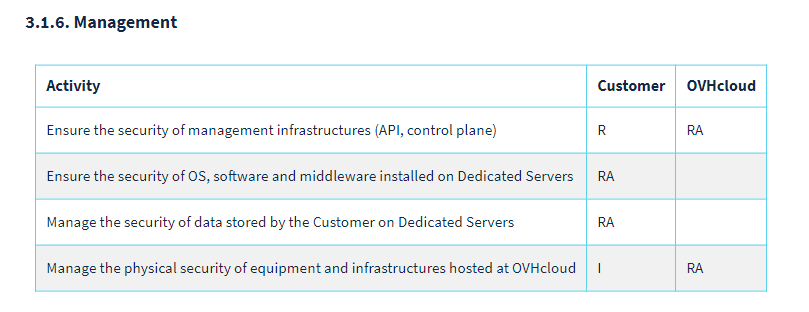
As a shared responsibility model, whilst OVH are responsible for providing the uptime for the service, and security of the management plane, the customer is solely responsible for the security of the rented instances, as per the image below. (Source)
This brings me to the topic of today, architecting for security within OVH.
The OVH Firewall
I do have some serious critique for OVH at this point, their ‘firewall’ offering. There are multiple key limitations that I want to highlight in turn.
20 Rules Maximum – You can only apply 20 rules per IP address/server within OVH, and you still require the final rule to be a block rule if you don’t want to permit everything anyway.
No IPv6 Support – Despite OVH offering IPv6 addresses, OVH don’t provide a way to provide any level of network-edge protection to an IPv6 address, pushing the responsibility for securing this protocol downstream to your server.
Filters only traffic external to OVH – This one was the one that amazed me the most, firewalling doesn’t exist between tenants of the OVH network, meaning that even if you put a block on all traffic via the OVH firewall, any server within OVH’s network could still connect to you, if your server isn’t secured.
In summary, these three points make the OVH firewall a poor choice for protecting your infrastructure.
Server-Level Protection
The logical next step to mitigate the OVH Firewall shortcomings, is to protect your servers directly. Some operating systems have better native tools than others for this. For example, if you have a Windows Server, then simply running an installer that requires administrative privileges could be enough to result in additional inbound firewall rules being added without your explicit knowledge. The best defence for these servers is a block all rule for TCP & UDP, then poking small holes for specific ports that require inbound connectivity and locking those down to just the IP addresses required for public communication, this won’t impact outbound connectivity, as sessions that originate on the server will still be allowed to flow.
This still presents a significant downside, if the server is compromised, the firewall exists on the compromised device and can be opened up to allow for a persistent backdoor.
Bringing Your Own Firewall
A better approach than allowing devices to have persistent and direct internet access, is to bring your own firewall. You could either run this virtually on a hypervisor, preferably dedicating your WAN interface to the WAN link of the firewall or using a physical server as the WAN connection and then disabling your WAN interfaces on your other physical devices and providing a default gateway via your firewall over the vRack. Using a firewall in this manner could help, however there isn’t a way to physically disconnect the WAN interface of a physical server, and utilise the vRack exclusively, meaning that any physical server could still get a direct breakout (and subsequently, accept a direct connection in) via its WAN port. This can at least be mitigated when using a hypervisor via vSwitch configurations, whereas for a physical server the interface just needs enabling and getting an IP address via DHCP.
vRack Isolation
Focusing on the concept of securing communications between servers, a typical way to provide layers of isolation is through the use of VLANs. OVH support 4,000 VLANs per vRack, but the consideration to be aware of is, all VLANs are permitted on all servers, with no level of management to control this. This means that even at a basic level of wanting a DMZ and a LAN VLAN, a physical server could perform VLAN hopping just by reconfiguring its interface, circumventing any routing or firewall requirements. The best way around this for physical devices would be to utilise separate firewalls per network, with separate vRacks, and then leverage a site-to-site VPN to provide connectivity between the firewalls for necessary communications, which is a huge overhead and burden. Thankfully hypervisors typically restrict the virtual networks to specific VLANs to perform the filtering necessary on virtual servers.
Risks By Statistics
Now I want to close by highlighting the scope of the issues here. People and organisations simply aren’t paying enough attention to securing their OVH instances. I’ve collated some observation data from Shodan.io to highlight what is clearly visible on the internet. The numbers are shocking (and accurate as of 26th July 2023):
- Port 22 / SSH: 490,296 Servers. Without connecting and attempting to sign in I can’t say how many of these are utilising username & password, and how many are using keys for authentication. Regardless, this is a huge number of servers that don’t likely need SSH open for access from any IP address on the internet. Granted there are solutions such as Fail2ban available to reduce the likelihood of compromise, but this is still an unnecessary risk for most.
- Port 23 / Telnet: 1,199 Servers. I’d like to believe these were honeypots, but statistically speaking it’s highly unlikely they all are, unencrypted credentials passing over the internet is not something that should be happening in 2023… There are additional results on port 2323 as well, but due to the potential to be advertising on multiple ports I’ve excluded these from the result count.
- Port 21 / FTP: 173,720 Servers. Some results were showing connectivity without any authentication being required here.
- Port 3389 / RDP: 49,681 Servers. Looking beyond the default port to other devices captured presenting RDP sessions increases this number further to 45,591.
- Port 445 / SMB: 25,178 Servers. 222 of these servers were publicly advertising their ADMIN$ or C$, with a mixture of SMB versions, including SMB v1.
If we then consider that some servers above and beyond the list here will be using the OVH firewall, and thus still be vulnerable to threats inside the organisation, the numbers will increase further, but without IP scanning the entirety of the OVH IP address space, this remains unknown. It’s also against the OVH terms of service to perform network port scans from their hardware, so I won’t be attempting to qualify this information further.
Conclusion
The unfortunate conclusion to this is that there does not yet exist a way within the OVH platform to provide a secure-by-design approach to their physical server offerings. OVH would certainly benefit by offering rental of firewalls and segmentation of traffic, or greater per-server control over VLANs for starters. The requirement to rely on the endpoint securing itself is an unfortunate one, as this does not support a layered defence approach that would typically be deployed in most architectures. Other product stacks within OVH thankfully do mitigate some of these issues, within the public cloud product portfolio, you can deploy a gateway and load balancers to centralise ingress and egress to the private environment. OVH also offer managed VMware environments that provide the NSX product suite for extra security, but this comes at a huge price tag.

 Michael Paul | @micoolpaul
Leave a comment