

This is a guest post from Maximilian Maier
I’ve come across this request quite frequently, so I decided to write a short blog post about it.
Many Proxmox VE customers use the VMIDs or VMID ranges to organize their virtual machines at the datacenter level. Within Veeam it’s currently not possible to specify a VMID during the worker deployment or when restoring a VM. As a result, the next available VMID will be assigned.
Veeam’s Product Management has already confirmed that this feature is on the roadmap. Until then, the following workaround may help.
Adjusting the Proxmox VMID pool
It’s possible to adjust the VMID pool in the Proxmox VE Datacenter configuration: https://pve.proxmox.com/wiki/Manual:_datacenter.cfg
While this can be configured directly in the configuration file, it can also be managed through CLI or GUI.
Show current configuration: pvesh get /cluster/optionsShow next available VMID: pvesh get /cluster/nextidAdjust VMID pool: pvesh set /cluster/options --next-id lower=xxx,upper=xxx
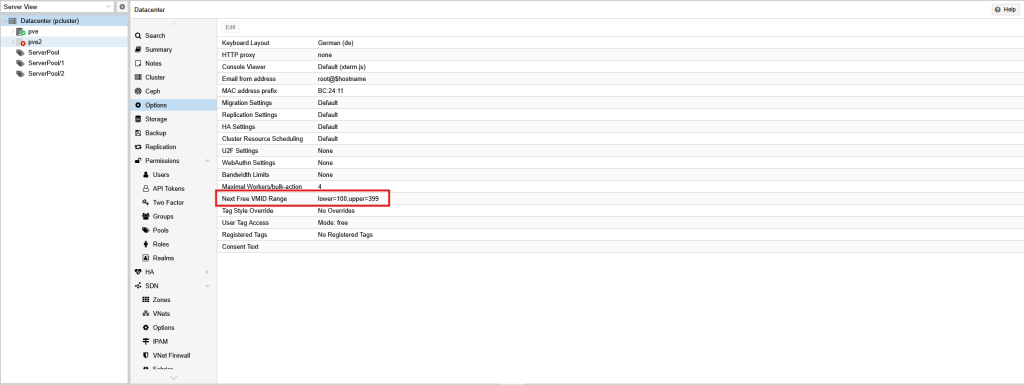
Before deploying a worker or restoring a virtual machine, set the lower VMID to the value you want to assign. Afterwards, change it back to its previous value to continue the regular VMID assignment.
This is certainly not an ideal workaround and doesn’t scale well when restoring multiple VMs with non-consecutive IDs. For now, however, it’s probably the most practical way if you need to organize VMs by VMID.
I will update this blog post as soon as Veeam introduces support for custom VMID assignment.


Leave a Reply